Superwhisper Review
Local-first dictation with cloud AI modes
Superwhisper is a voice dictation app for macOS, Windows and iOS offering both local (offline) and cloud AI transcription. Priced at $8.49/month or $249.99 lifetime. This independent review covers WER/CER accuracy across 6 test recordings, a privacy analysis, and a UX verdict.
Superwhisper Verdict
Powerful local engine buried under a broken cloud flagship
Superwhisper version 1.4.0 scores 6.3/10 overall in Voice-list independent testing (tested 2026-05-30). Best local model (Whisper Standard) achieves 2.0% aggregate WER across 6 recordings. Best cloud model (Ultra) achieves 2.4% aggregate WER.
Works well for
- Whisper Standard (hidden): best-in-class local accuracy at 1.8% WER
- Genuine offline mode — no audio leaves device in local configuration
- Lifetime license option at $249.99 — no subscription required
Watch out for
- S1-Voice (cloud flagship default) shows 15-37% WER across test recordings
- Trial is 15 minutes total — blocks even offline models after limit
- Cloud mode sends app name, clipboard, and focused text to Modal.com beyond audio
Best for
- Power users willing to dig past default settings and switch to Whisper Standard
Not for
- Anyone who installs and expects the default model to work well
Superwhisper Accuracy & Speed
| Model | Accuracy | Speed | ||
|---|---|---|---|---|
| English | Local | Parakeet Default 1.1 GB CPU Tested on CPU Ryzen AI 9 HX · 32 GB RAM
NVIDIA Parakeet TDT 0.6B — default local model in Superwhisper 1.4. Fast, good on clean speech, but has no ITN: numbers and dates come out as spoken words. Default local model — users see this first | 82.3%
Word accuracy
The share of words the model got right (100% − word error rate). 100% = every word correct.
17.7% WER Word Error Rate
What % of words the model got wrong. 0% = every word correct.
13.7% CER Character Error Rate
Same as WER but measured letter-by-letter. Usually lower than WER.
25% PER Punctuation Error Rate
How accurately the model placed commas, periods, and other punctuation.
4 / 10 |
~3s
2–5s range
Post-stop latency
Seconds from pressing Stop to the final text appearing in your active app. Average across all test recordings.
8 / 10 |
| Whisper Standard Best accuracy hidden in UI
500 MB CPU Tested on CPU Ryzen AI 9 HX · 32 GB RAM
OpenAI Whisper large-v2 running locally. Best accuracy of all tested models but hidden from the main model picker — requires Library search to find. Hidden — Settings > Library > search "Whisper Standard" | 98.0%
Word accuracy
The share of words the model got right (100% − word error rate). 100% = every word correct.
2.0% WER Word Error Rate
What % of words the model got wrong. 0% = every word correct.
0.5% CER Character Error Rate
Same as WER but measured letter-by-letter. Usually lower than WER.
35% PER Punctuation Error Rate
How accurately the model placed commas, periods, and other punctuation.
9 / 10 |
~8s
6–12s range
Post-stop latency
Seconds from pressing Stop to the final text appearing in your active app. Average across all test recordings.
5 / 10 | ||
| Cloud | S1-Voice Default Superwhisper's proprietary cloud model, presented as the headline AI feature. Applies aggressive rewriting that causes large content losses on some recordings. Default cloud model — users land here without changing settings | 74.2%
Word accuracy
The share of words the model got right (100% − word error rate). 100% = every word correct.
25.8% WER Word Error Rate
What % of words the model got wrong. 0% = every word correct.
21.8% CER Character Error Rate
Same as WER but measured letter-by-letter. Usually lower than WER.
67% PER Punctuation Error Rate
How accurately the model placed commas, periods, and other punctuation.
2 / 10 |
~2s
1–4s range
Post-stop latency
Seconds from pressing Stop to the final text appearing in your active app. Average across all test recordings.
9 / 10 | |
| Ultra Best Cloud Cloud Whisper-class model offered as "Ultra" tier. More conservative post-processing than S1-Voice — accurate and stable across all recording types. Better than S1-Voice on every recording — less prominently surfaced in UI | 97.6%
Word accuracy
The share of words the model got right (100% − word error rate). 100% = every word correct.
2.4% WER Word Error Rate
What % of words the model got wrong. 0% = every word correct.
1.0% CER Character Error Rate
Same as WER but measured letter-by-letter. Usually lower than WER.
40% PER Punctuation Error Rate
How accurately the model placed commas, periods, and other punctuation.
8 / 10 |
~3s
2–5s range
Post-stop latency
Seconds from pressing Stop to the final text appearing in your active app. Average across all test recordings.
8 / 10 | ||
| No models match — turn a filter back on. | ||||
Superwhisper for Coding & IT Best: Whisper Standard Ultra
Coding
- snake_case identifiers mostly preserved
- CLI flags correct
- No hallucinations
- "Tauri" → "Tory"
- "tokio::runtime" → "Toko runtime"
Conference
- Best on accented English speaker — 0.45% WER
- "Kubernetes", "PostgreSQL", "microservices" exact
- Zero dropped sentences
- "load balancer" → "load balance" (once)
Coding
- snake_case identifiers intact
- CLI flags like "--release" correct
- No hallucinations
- "Tauri" → "Tarry"
- "axum" → "axm"
Conference
- Strong on accented English
- "PostgreSQL" and "Kubernetes" exact
- Only 1 minor substitution across 89s
- "schema" → "schema" (case flip once)
Coding
- Handles prose segments cleanly
- No hallucinations
- "cargo.toml" → "Cargo .toml"
- "tokio::spawn" → "tokio spawn"
- "impl Trait" → "imp Trait"
Conference
- Clean transcription of accented English speaker
- Technical terms like "API" and "SDK" correct
- "Kubernetes" → "Cubernetes"
Coding
- Faster response than local models (~2s)
- "impl AsyncRead" → "RUMP_INSTAL"
- Dropped entire code block (lines 14–17)
- "CloudFace" hallucinated (not in source)
Conference
- Fast turnaround even on longer clip
- "distributed systems" → "destructive systems"
- Dropped 3 full sentences mid-recording
- Non-deterministic: 37% WER run 1 vs 16% run 2 — same audio
Superwhisper for Everyday & Long-form Best: Whisper Standard Ultra
Casual
- Perfect: zero errors on casual speech
- Natural disfluency handling
Long-form
- Best long-form result of any engine tested — near-perfect over 4 minutes
- No drift, zero hallucinations
- All numbers, currency and percentages formatted correctly
- One extra "and" — the only error in the whole recording
Casual
- Perfect: zero word errors
- Disfluencies handled cleanly
Long-form
- No drift over 4 minutes — consistent quality throughout
- Zero hallucinations across full recording
- "LinkedIn" split into "linked in"
- "$9. 9 versus" collapsed into "$9.9 versus"
- "counterargument" spelled as two words
Casual
- Perfect: zero word errors on casual speech
- Disfluencies (um, uh) preserved naturally
Long-form
- No quality drift over 4 minutes — consistent throughout
- Numbers and currency mostly formatted correctly
- "numbers genuinely" mangled into "numbinely"
- "50/50" misheard as "550"
- "accelerant" → "acceleration"; dropped "trial" and "through"
Casual
- Lost 2 of 3 sections — only opening paragraph survived
- Heavy rewriting distorts meaning of what remains
Long-form
- Completes the full recording without timeout
- Catastrophic drift mid-recording — hallucinated a whole passage ("a range of results... the last one was a long time ago")
- Dropped the entire "let me give you the actual numbers" section
- Worst long-form result of any engine tested — 18.9% WER
Superwhisper for Numbers & Structured Data Best: Whisper Standard Ultra
Numbers/ITN
- Dates and currency nearly exact
- "$12,400.75" and phone number correct
- "March 15th, 2026" → "March 15, 2026" (minor format)
Numbers/ITN
- Phone number and date format correct
- "$12,400.75" → "$12400.75" (comma dropped)
- "Order ID" label partially dropped
Numbers/ITN
- "$12,400.75" exact
- Phone number format correct
- "March 15th, 2026" → "March 15, 2026"
- "ABC-123456" → "ABC 123456" (hyphen dropped)
Numbers/ITN
- No ITN — numbers output as spoken words throughout
- "$12,400.75" → "twelve thousand four hundred dollars and seventy five cents"
- Phone number and order ID completely garbled
Superwhisper: Noise Resistance Best: Parakeet Ultra
Noisy Cafe
- Noise has zero effect — identical output to clean version
- Café background at SNR 5 dB not detected
Noisy Cafe
- Noise has zero effect — identical output to clean version
Noisy Cafe
- Near-perfect under café noise — only 1 minor substitution
- "in-between" split once
Noisy Cafe
- Handles café noise better than casual clean — rewriting helps here
- "in-between" → "in between"
- Some filler words not stripped
Tested on Windows 11 26H2 · AMD Ryzen AI 9 HX 370 · 32 GB RAM · NVIDIA RTX 5070 Laptop 8 GB
Superwhisper UX & Integration
Getting started & flow
Reached first successful dictation in about a minute — nothing superfluous.
Default shortcut is comfortable and remappable, no system conflicts — but the push-to-talk option does not actually work.
Shows a center-screen message when the trial runs out, but there is no fallback — and settings navigation is scattered across sections.
Recording experience
Clear recording pill / overlay — recording state is obvious.
Easy to cancel a bad dictation; cancel hotkey included.
Pastes reliably into every app tested.
Auto-inserts the text and can restore your previous clipboard afterwards.
Managing your work
Browsable history with search; you can open a recording to see its mode, duration and even the prompt used. No export.
Fast switching by hotkey and from the pill UI.
~160 MB RAM · 0.3% CPU at rest (cloud).
Superwhisper Features
Text processing
Cloud AI modes rewrite text — many models, BYOK for several providers. But S1-Voice over-rewrites and drops content.
Per-word replacements applied at transcription.
Bundled into the custom-dictionary feature, not a separate snippets UI — and also doable via LLM post-processing instructions.
Output & extras
Hidden behind the tray icon. Broken on LLM modes (returns a stale buffer); only works on the Voice mode, and the UX is so confusing it barely counts.
Pause, lower, or fully mute media while recording.
No built-in translation mode.
No Ask / Q&A LLM mode.
No txt / srt / json export, and history cannot be bulk-exported.
Local recognition
Genuine offline mode — no audio leaves device in local configuration.
Parakeet, Whisper Standard (hidden), S1-Voice, Ultra — but best local model is buried.
Superwhisper Privacy
Superwhisper keeps audio on-device when using local models. Cloud models upload audio to modal.com only after you press Stop.
Endpoints: modal.com, api.superwhisper.com
Nothing is uploaded until you confirm by pressing Stop. Cancel before then and the audio never leaves.
You can use the app without an account, but some features ask you to sign in.
In cloud mode: active app name, focused element text, clipboard contents, computer name, locale, timezone
Your recordings are not used to train models.
You can turn off product analytics and telemetry.
You can set the app to never store your transcription history.
From the privacy policy not scored
- Privacy policy guarantees data is never used to train AI models and is not retained on Superwhisper servers — all storage is local.
- States it collects no usage data and uses no cookies or tracking technologies.
- Note: the observed cloud mode still sends app context and clipboard to Modal.com — stronger than the policy implies, so cloud users should not assume "local-only".
Pricing
- Voice to text in any app
- Meeting recording and transcription
- Unlimited use of small AI models
- 100+ languages, custom prompt control
- 15-minute trial limit (all models)
- Unlimited use of cloud and local AI models
- Bring your own AI API keys
- Translate any language to English
- Transcribe audio and video files, priority support
- All Pro features, one-time payment — no subscription
- Activates across multiple devices
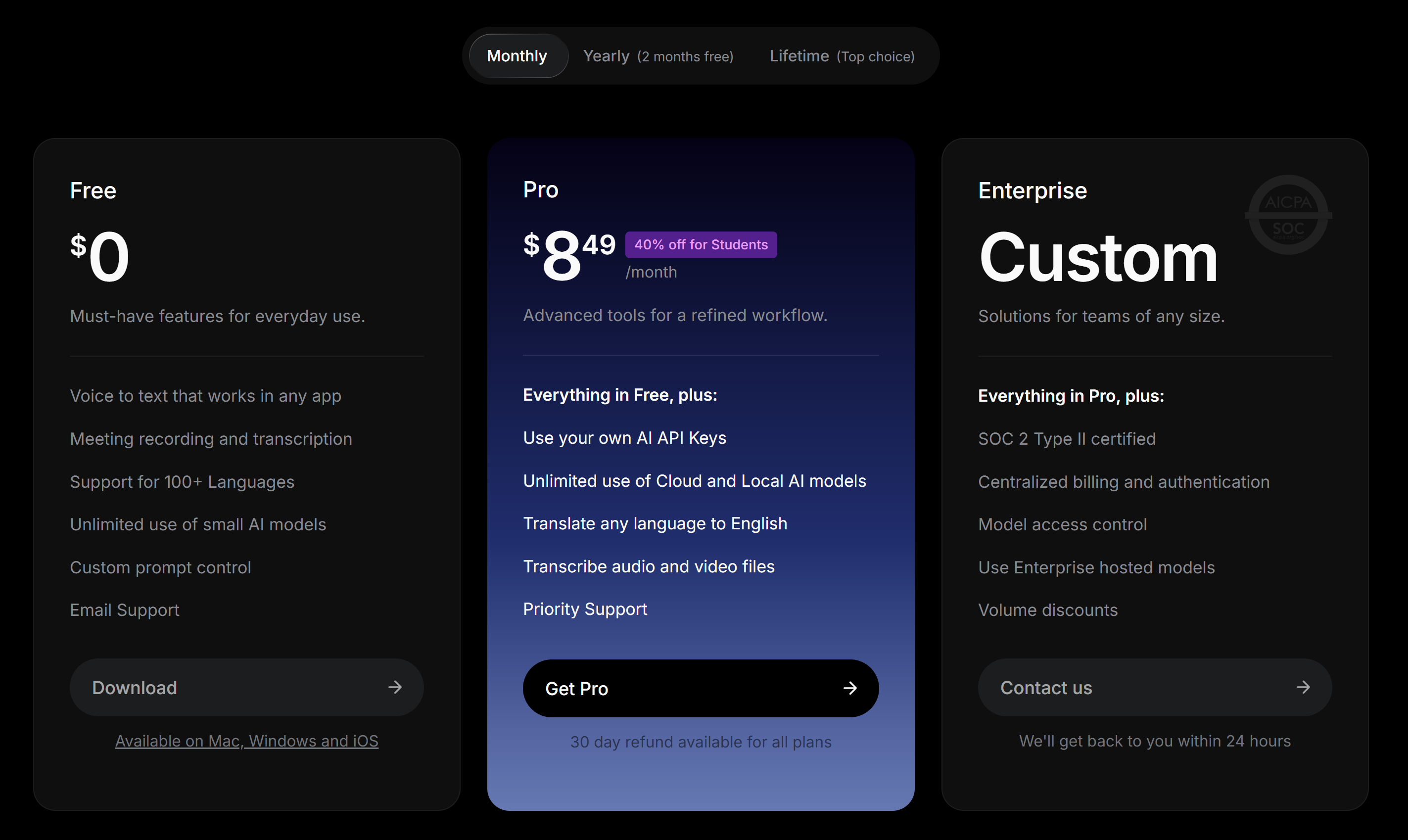
Superwhisper on the free tier
Superwhisper has no real free tier — only a 15-minute trial, after which a paid plan is required. It is excluded from our Best free option ranking. How we judge free tiers →
Methodology
Accuracy scores use WER (Word Error Rate) computed against multi-reference ground truth
with {a|b} alternates for valid transcription variants (e.g. 48% and
forty-eight percent are both accepted). Audio delivered via virtual cable from
ElevenLabs TTS. Single test session on 2026-05-30.
Superwhisper benchmarks
How Superwhisper places against every app we tested, on identical audio.
Superwhisper screenshots
Actual screenshots from our test session — click any image to view full size.
Superwhisper head-to-head
See Superwhisper compared point by point against the alternatives.